

Connect Claude to your FileMaker data
Claude can answer questions from your FileMaker data directly: "which customers have overdue invoices", "how did March compare with February", "what is on order SO-40112". It needs a way to reach your file safely. That is what an MCP server does, and Ailimu is one built for FileMaker.
This guide takes you from nothing to Claude answering from live data. Allow about ten minutes.
What you need
- A FileMaker Server that Ailimu can reach over HTTPS. It can be on your own network, in your cloud account, or with a FileMaker hosting provider.
- A machine to run Ailimu on, with Docker: a Linux server, or a Mac to try it out.
- Claude: Claude Code or Claude Desktop.
1. Create a FileMaker account for Ailimu
In your file, create an account used only by Ailimu, with a privilege set that can see only what you are willing to expose. Give that privilege set the fmodata extended privilege, and fmrest as well if you want Claude to run scripts.
This is your strongest control. Ailimu signs in as this account, so anything the account cannot see, Claude cannot see either.
2. Run Ailimu
On the machine that will run it, make a folder with two files. .env holds the
account you just created:
FM_USER=ailimu
FM_PASS=your-filemaker-password
docker-compose.yml runs the container:
services:
  ailimu:
    image: ailimu/ailimu:latest
    ports:
      - "8081:8081"
    env_file:
      - path: .env
        required: false
    volumes:
      - ailimu-config:/config
    restart: unless-stopped
volumes:
  ailimu-config:
Then start it and read its start-up message:
docker compose up -d
docker compose logs ailimu
It prints the address of the setup wizard and a setup code. If Docker is new to you, the install guide covers installing it on Linux and macOS.
3. Choose what Claude can see
Open the wizard, create the owner account with the setup code, and add a connection:
- Connect. Enter your FileMaker Server's address and pick the file.
- Tables. Ailimu reads the schema and sorts your tables into core records, transactions, lookups and logs. Tick the ones people ask about. For each, choose which fields Claude can read and search. Suggest a starting set picks sensible defaults.
- Scripts (optional). Expose FileMaker scripts as tools, if you want Claude to run them.
- Publish. Your tools are live straight away.
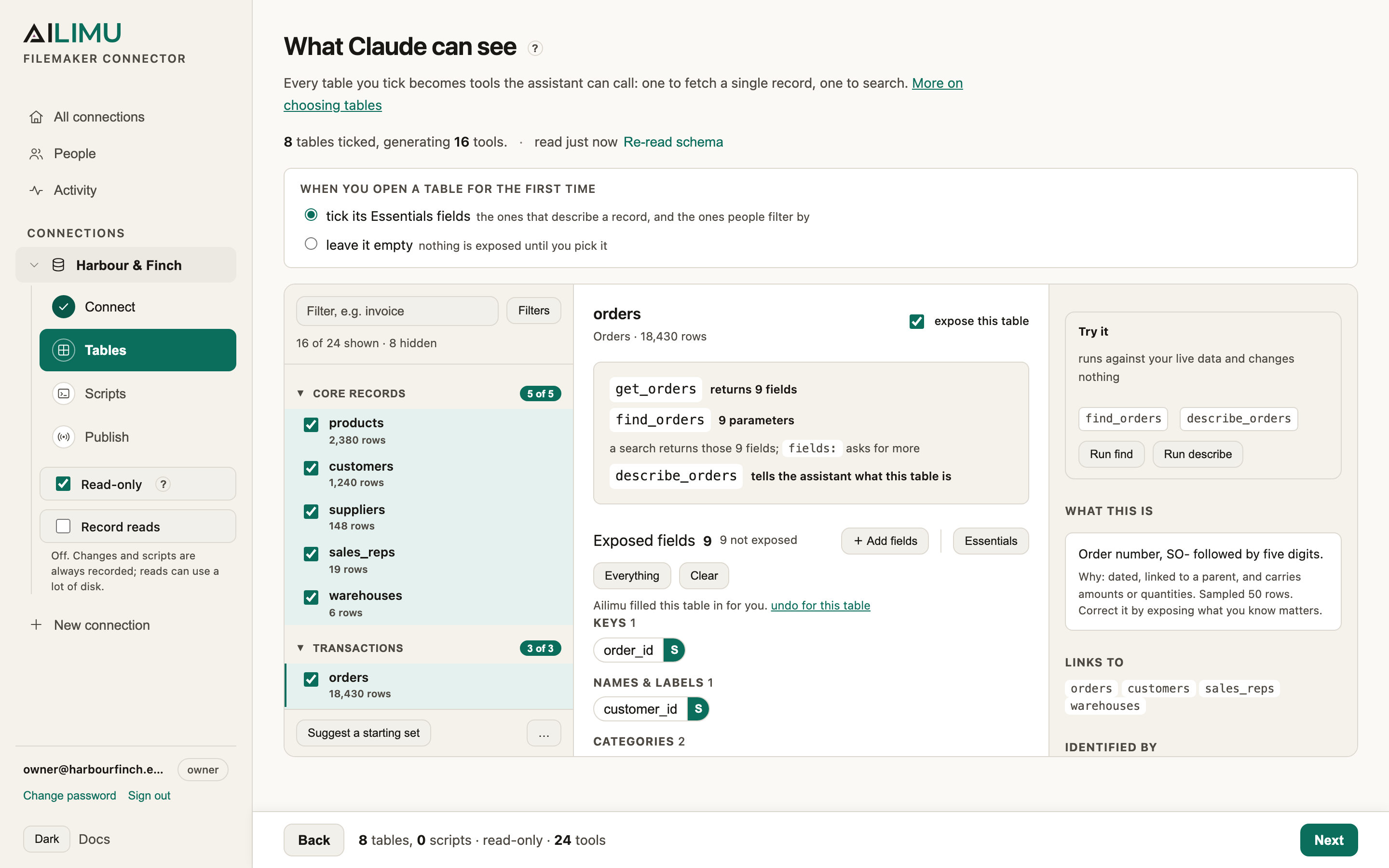
Before publishing, Try it runs a tool against your live data so you can see exactly what Claude would get back.
4. Point Claude at it
The Publish step shows the exact command for your connection. For Claude Code it looks like this:
claude mcp add --transport http sales http://your-server:8081/mcp/sales \
  -H "Authorization: Bearer YOUR-TOKEN"
For Claude Desktop, add the block the wizard gives you to
claude_desktop_config.json and restart Claude. Either way, use your server's
name or address rather than localhost if Claude runs on another machine.
5. Ask
Start a new conversation and ask something only your data can answer:
Which trade customers have overdue invoices, and how much do they owe?
Claude picks the tools that answer it, calls them against your server, and replies. Every change it makes, and every script it runs, appears in Activity in the wizard.